The Insights Feature
The Insights tab provides instructors with important data metrics so they can self-govern the quality of teaching.
Within the Insights tab, you’ll see 3 different tabs – Overview, Enrollments and Reviews.
Each tab is tailored to help you see the data that’s most relevant to accomplish your teaching goals.
The Overview tab shows you some important metrics that reflect on the quality of your teaching. We have carefully selected these metrics.
You’ll see 5 key data metrics: Active Enrollments, Completed Enrollments, Classes Delivered, Reviews and Attendance.
You’ll also see Goals Achieved and Ratings & Reviews.
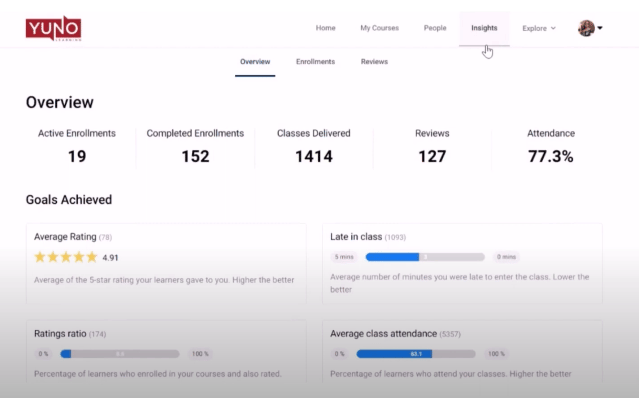
You should strive to achieve the following teaching goals for yourself:
Average Rating: It is the average of the 5-star rating your learners gave to you. The higher it is, the better.
Late in class: This shows on an average how late you’re in starting the class. Needless to say, teaching professionally requires you to start your classes in time.
Ratings Ratio: Your Ratings ratio tells you the percentage of learners who enrolled in your batch and also left a rating for you. The more of your learners rate you, the better.
Average class attendance: It is the percentage of learners who attend your classes. It should be as high as possible to improve learning outcomes.
Under Ratings & Reviews you’ll find following 4 parameters:
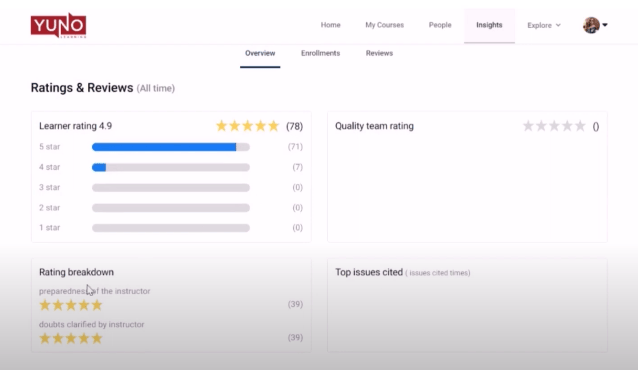
Learner rating – The rating given by your learners over time
Quality team rating – The rating given by Yuno’s academic staff.
Rating breakdown – Breaking down rating further on some important parameters.
Top issues cited – The issues that are most cited by your learners and Yuno’s academic staff so you can improve on those areas.
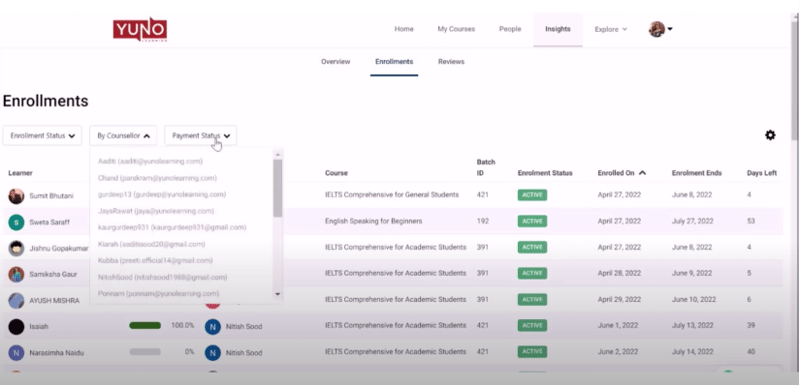
In the Enrollments tab, you’ll see the batch details of all of your Active Learners. You can use various filter options to filter out the records you want to view.
Reviews tab contains all the reviews given by your learners.